I Built the Same AI Agent in 5 Frameworks: What Actually Changes (and What Doesn’t)
A hands-on comparison of CrewAI, LangGraph, LlamaIndex, PydanticAI, and Microsoft Agent Framework using the same flight-assistant agent: setup, tool calling, RAG, MCP, execution flow, and what to watch for in runtime and token usage.

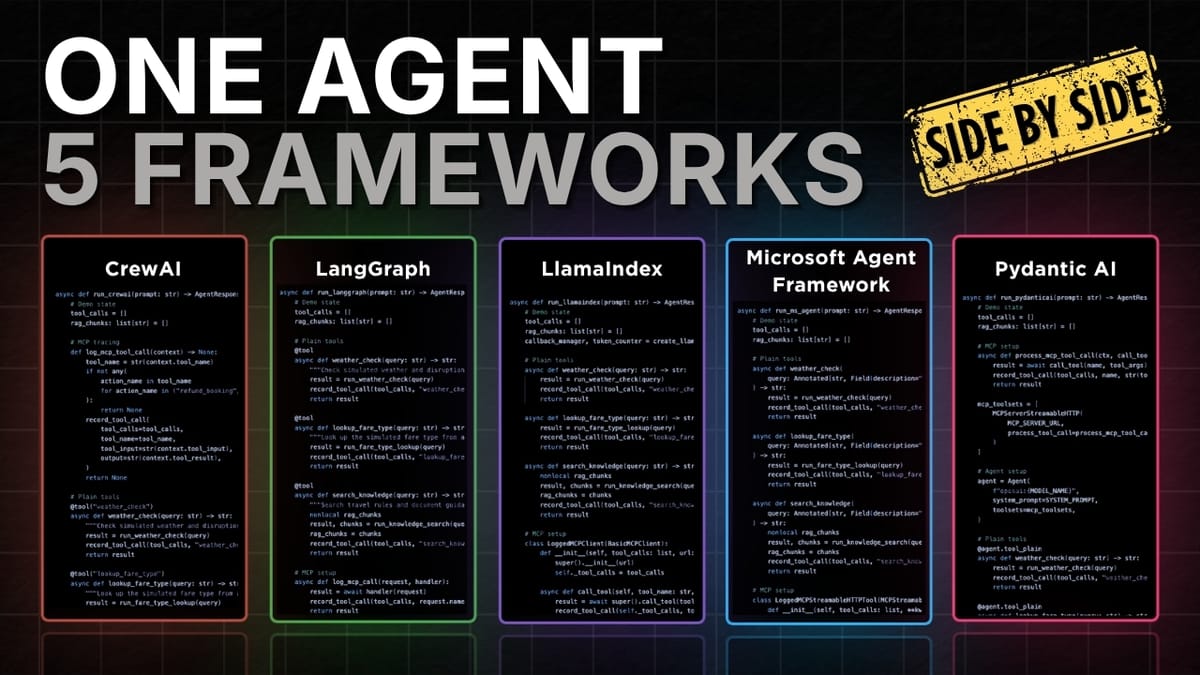
If you’re trying to pick an agent framework in 2026, the marketing pages won’t help much. The fastest way to learn is to build the same agent five times and compare what changes: how you define the agent, register tools, wire up RAG, connect MCP, and actually run the thing.
That’s exactly what this comparison does using one baseline “flight assistant simulator” implemented in:
- CrewAI
- LangGraph (intentionally used instead of LangChain for a lower-level comparison)
- LlamaIndex
- PydanticAI
- Microsoft Agent Framework
The goal isn’t to crown a universal winner. It’s to help you choose the framework that matches how you like to build.
Source video
This article is based on the YouTube video: “I built the same AI agent in 5 frameworks (So you don't have to)”
The baseline: one agent, one fair test harness
To keep the comparison honest, each framework runs:
- in its own isolated container
- with its own dependencies/requirements
- connected to the same shared MCP server
- feeding into the same comparison UI
This matters because “framework A felt faster” is meaningless if it had different dependencies, different tool servers, or different logging.
The demo agent: a flight assistant simulator
The agent can:
- Check weather (tool call)
- Look up fare type (tool call)
- Look up refund rules via RAG (implemented as a “search knowledge” tool)
- Process a refund via MCP booking actions (a shared MCP server tool)
The data is dummy for the demo, but the structure is what you’d use with real APIs and real documents.
Concrete takeaways (if you only read one section)
- All five frameworks converge on the same mental model: define an agent + give it tools + run it.
- RAG looks the same in practice in this demo: it’s “just another tool” that retrieves text and feeds it back as context.
- MCP integration is the real differentiator: each framework has its own ergonomics for connecting, discovering tools, and keeping the connection open.
- Execution flow varies a lot: some frameworks are “call
run()and go,” others want tasks/crews/graphs. - Runtime and token usage fluctuate run-to-run, but you can still learn patterns (e.g., some setups tend to be more token-efficient).
1) Agent setup: what you write before anything runs
At setup time, every framework needs the same ingredients:
- a model/client (e.g., OpenAI chat model)
- instructions (system prompt / role / goal)
- tools (local functions + MCP tools)
Where they differ is how much structure they impose.
CrewAI: role/goal/backstory as first-class concepts
CrewAI’s setup emphasizes “who the agent is”:
- define the model
- create an agent with role, goal, backstory
- attach tools and MCP servers
This is nice when you want strong “agent identity” scaffolding, even for a single-agent app.
LangGraph: create a ReAct-style agent from primitives
LangGraph starts with the model and then builds an agent via a helper like create_react_agent(...).
It’s intentionally lower-level than “batteries included” agent abstractions, which makes it easier to compare behavior and control the flow.
LlamaIndex: straightforward agent constructor
LlamaIndex sets up:
- an LLM client
- tools
- a system prompt
Even though retrieval is a huge part of LlamaIndex, the demo keeps it simple: the agent still looks like “LLM + tools + prompt.”
Microsoft Agent Framework: model client → as_agent(...)
Microsoft Agent Framework creates a model client and then converts it into an agent with:
- name
- instructions
- tools
It’s a clean pattern if you like explicit “client → agent” transformation.
PydanticAI: start with the agent object, then attach tools
PydanticAI flips the flow:
- instantiate the agent with provider/model/system prompt
- register tools directly on the agent (and optionally via toolsets)
This feels natural if you like Pythonic composition and typed interfaces.
2) Tool calling: same idea, different ergonomics
Tools are how the agent does real work (weather lookup, fare lookup, etc.). Across frameworks, tools are basically functions plus metadata.
CrewAI and LangGraph: decorator-based tools
Both use a @tool decorator on normal Python functions, then you pass a list of tools into the agent.
LlamaIndex: functions become tool objects
Tools start as functions, then get wrapped (e.g., via a FunctionTool.from_defaults(...) helper) so the agent can reason about them.
Microsoft Agent Framework: typed async tools
Tools are async functions with typed inputs (using Annotated + Field descriptions). If you care about schema clarity and validation, this is a strong pattern.
PydanticAI: register tools directly on the agent
Instead of building a separate list, you attach tools via something like @agent.tool_plain.
If you prefer “the agent owns its tools,” this is a clean mental model.
3) RAG: in this comparison, it’s just another tool
RAG (retrieval augmented generation) is how you answer questions using private docs or specific policies.
In this demo, every framework uses a search_knowledge(query) function that:
- searches a markdown policy doc
- pulls relevant snippets (e.g., refund rules)
- returns them so the model can answer correctly
Example policy logic:
- Basic fare: non-refundable
- Standard fare: 50% refundable
- Flex fare: 100% refundable
The key point: RAG isn’t “magic framework stuff” here. It’s implemented as a tool call that returns text context.
That’s a useful design lesson:
If your RAG pipeline can be expressed as a tool, you can port it across frameworks with minimal changes.
4) MCP: the “USB-C for tools” (and where frameworks really diverge)
MCP (Model Context Protocol) gives agents a standard way to connect to external tools.
To keep the comparison clean, the demo uses HTTP / streamable HTTP MCP transport for all frameworks.
The shared MCP server
The MCP server exposes a booking action tool (e.g., refund_booking) that returns true in the demo.
So the agent’s job is to:
- decide whether a refund should happen (based on weather + fare rules)
- call the MCP tool only when appropriate
What changes across frameworks
The pattern is consistent:
- connect to MCP server
- discover tools
- make tools available to the agent
- (optionally) wrap calls for logging
But the ergonomics differ:
- CrewAI: configure an MCP server object and pass it into the agent.
- LangGraph: create an MCP client, fetch tools, and include them in the tools list.
- LlamaIndex: use an MCP client + a tool-spec wrapper to convert MCP tools into agent tools.
- Microsoft Agent Framework: open the MCP tool connection with an async context manager while the agent runs.
- PydanticAI: pass MCP toolsets into the agent and optionally wrap execution for logging.
If you’re building “real” agents that rely on external actions, MCP wiring is worth evaluating early, because it’s the part you’ll touch constantly.
5) Execution flow: how you actually run the agent
This is where the frameworks feel most different day-to-day.
CrewAI: agent → task → crew → kickoff
Even for one agent, CrewAI wants structure:
- wrap the prompt in a Task (description + expected output)
- put the task and agent into a Crew
- run with
kickoff_async()
This is a good fit if you expect to grow into multi-agent orchestration.
LangGraph: ainvoke and parse messages
With a single agent, it’s basically:
agent.ainvoke(user_prompt)- read the final answer from the returned messages
LlamaIndex: agent.run(prompt)
Very direct: run the agent, get the result.
Microsoft Agent Framework: open MCP tool context, then run
Because MCP tools require an open connection, the run pattern is:
async with mcp_tool:agent.run(prompt)- read the final answer from the result
PydanticAI: agent.run(prompt)
Also direct: run and read the result.
6) What the side-by-side runs reveal (runtime, tokens, and behavior)
The test prompt is intentionally “agent-y”:
“My booking ID is ABC123 and I'm flying from Montreal to Vancouver tomorrow. Please check the weather and if it's bad, process the refund for my booking.”
To do this correctly, the agent should:
- look up fare type
- check weather
- retrieve refund rules via RAG
- only call MCP refund if conditions are met
Behavior consistency: surprisingly strong
Across runs, all frameworks generally:
- called the right tools
- used RAG to ground refund policy
- called MCP refund when fare type allowed it and weather condition triggered it
One interesting difference observed: Microsoft Agent Framework called the weather tool twice (once per city), while others called it once for both cities.
That’s not “wrong”, it’s a design choice you’ll want to notice when you care about tool latency and token/tool overhead.
Runtime and token usage: useful, but don’t overfit
The comparison UI reports runtime and total tokens. Two practical notes from the runs:
- Results can change between runs, even with the same prompt.
- Still, patterns can emerge (e.g., one framework often being more token-efficient).
Treat these numbers as signals, not benchmarks.
How to choose a framework (a lightly opinionated guide)
Here’s a pragmatic way to decide without bikeshedding:
Choose based on your “dominant pain”
- You want orchestration structure now (or soon): CrewAI or LangGraph
- You want a simple “agent + tools + run” loop: LlamaIndex or PydanticAI
- You want typed tool interfaces and explicit runtime control: Microsoft Agent Framework or PydanticAI
Evaluate MCP ergonomics early
If your agent will do real actions (refunds, tickets, CRM updates), MCP wiring and tool discovery will be part of your daily workflow. Don’t treat it as an afterthought.
Don’t ignore the “no framework” option
For some problems, a thin layer around:
- a model call
- a few tools
- a small state machine
…is easier to maintain than adopting a full framework.
Closing: the point of this comparison
Building the same agent five times makes one thing obvious: frameworks don’t change what an agent is, they change how you express it, how you control it, and how painful it is to integrate tools and runtime plumbing.
If you’re picking one to learn, pick the one whose defaults match your instincts:
- structured orchestration vs. minimal loop
- typed interfaces vs. flexible functions
- explicit runtime control vs. convenience